
All guides
- Getting started
- The Workspace
- Your chart
- Life areas
- Timing and calendars
- Advanced tools
- Account, saving and plans
Chart settings (⚙) in depth
Every control in a chart's Settings panel: style, display switches, Lagna source, house rotation and size sliders.
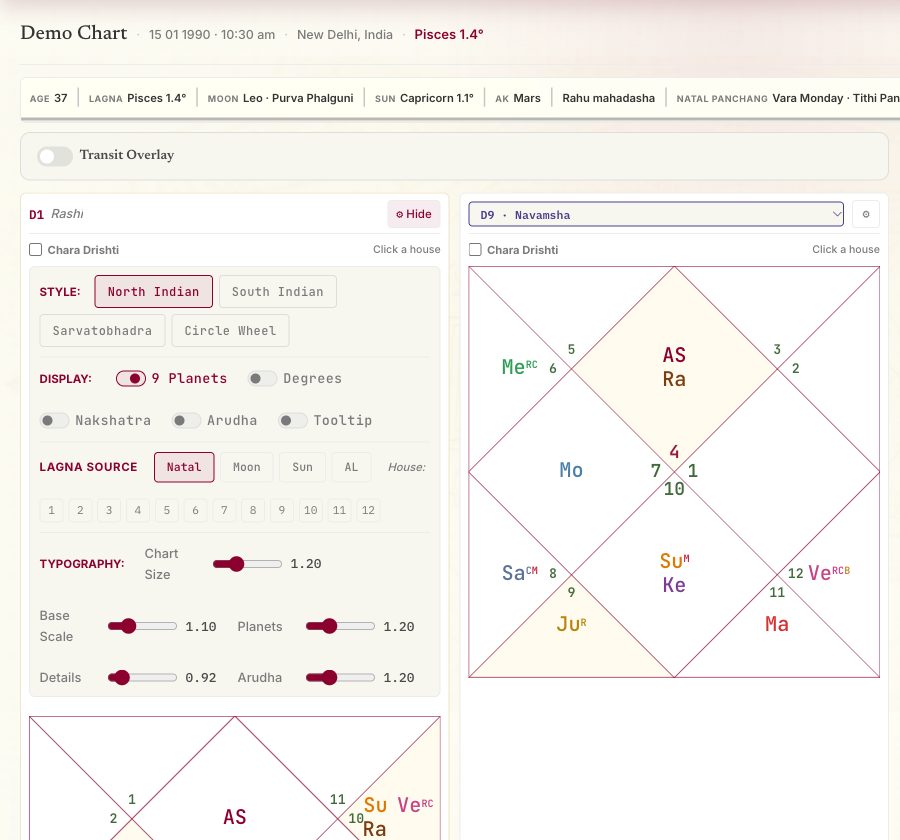 Open full size
Screenshots use a sample chart (15 Jan 1990, 10:30 am, New Delhi). Your screen shows your own chart.
Open and close
- Click ⚙ Settings at the top right of a chart card. The panel opens above the chart.
- Click ⚙ Hide to close it. Changes apply straight away; there is no Save button.
- The D1 card and the varga card each have their own panel.
Style
North Indian, South Indian, Sarvatobhadra or Circle Wheel. See Reading the charts for what each looks like.
Display switches
- 9 Planets: on shows only the nine grahas. Off also shows Uranus, Neptune and Pluto.
- Degrees: prints each planet's degree next to it.
- Nakshatra: prints the nakshatra abbreviation next to each planet.
- Karaka (paid plans): shows Chara Karaka labels such as AK, AmK and BK.
- Arudha: shows the Arudha padas (AL and the arudhas of the other houses) in the chart. When on, BPHS exceptions switches to the classical exception rules for arudhas.
- Show Natal: appears when Transit Overlay is on. Turn it off to see only the transiting planets.
- Tooltip: turns the hover card for planets on or off.
- Chara Drishti: the same as the tick box above the chart, with a Clear House button.
- Sarvatobhadra style only: Tithi, Vara and Legend.
Lagna source and house rotation
This redraws the chart from a different starting point, without changing the calculation.
- Natal: the normal chart from your Lagna.
- Moon: Chandra Lagna, the chart counted from the Moon's sign.
- Sun: Surya Lagna, counted from the Sun's sign.
- AL: counted from the Arudha Lagna.
- House 1–12: makes that house the first house (bhavat bhavam). For example, pick 7 to read the chart from the spouse's point of view, or 10 for career matters.
Typography sliders
- Chart Size: the size of the whole chart.
- Base Scale: all text in the chart.
- Planets: planet letters only.
- Details: small details such as degrees, nakshatras and sign numbers.
- Arudha: arudha labels.
What is remembered
The chart style is saved on this device, and to your account when you are signed in. The other switches and sliders return to their defaults when you reload. To make Degrees, Nakshatra, Karaka, ayanamsha, house system and nodes your permanent defaults, set them in Account → Chart preferences.